Description
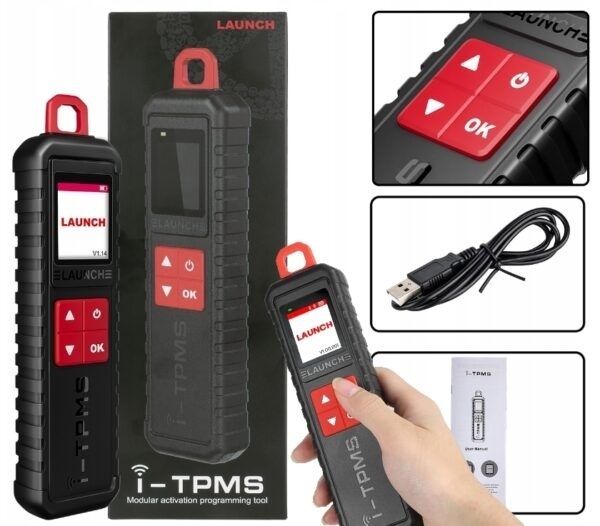
Launch Manual Service Tool TPMS i-TPMS Can connect with X-431 scanner and i-TPMS app supports all 315/433MHz sensors
NOTE - It also works independently with the i-TPMS application! It is not necessary to have a Device from the Launch X431 series
Launch and-TPMS provides professional and comprehensive TPMS services for repair shops to develop their business TPMS. It can program LAUNCH LTR RF sensors for an unlimited number of times to replace OE sensors. Sensor data can be read instantly and accurately, including sensor ID, tire pressure, tire temperature, battery status, etc.
7.Replace Tire Pressure Sensor Launch X-431 TSGUN TPMS
What is the difference between running i-TPMS and running X-431 TSGUN?
All support activation, programming, relearning and diagnostics of 315/433 MHz sensors.
Difference:
Launch X-431 TSGUN must be connected to x431 series scanners, while Launch and-TPMS can work independently via the i-tpms application on an Android phone.
Launch i-TPMS can not only be selected by car make and model, but can be selected directly and faster by OE part number, while Launch X-431 TSGUN can only be selected by car make and model.
Launch i-TPMS supporting multiple online repair resources including Operation Skills, DTC Help, Technical Manual, Repair Case, Tire Pressure Maintenance Database, so you can perform diagnosis and repair.
Replace the tire pressure sensor
Complete TPMS Features:
Activates all universal TPMS sensors.
Reads sensor data including sensor ID, tire pressure, temperature, battery status, etc.
Read/clear fault codes for TPMS system, allows you to clearly see the status of all TPMS sensors and compare sensor and ECU data to locate system faults immediately;
4 scanner launcher modes:
Auto Create: User can generate sensor ID by clicking the auto button
Manual input: x431 tsgun support allows you to manually enter the original ID or other ID.
Copy via OBD: Please connect the OBD cable to get the sensor ID from the ECU.
Copy by Activation: Requires original sensors to be activated first.
3 ways to relearn sensors:
Stationary relearning requires you to place your vehicle in learning mode and follow the on-screen instructions to complete it.
Automatic relearning, for some vehicles, can be completed by driving. To perform this operation, refer to the on-screen learning steps.
OBD Relearn directly writes TPMS sensor IDs to the TPMS module via the OBD connector. To relearn through OBD, first activate all sensors, then use the diagnostic tool with the attached VCI module to complete the learning steps according to the on-screen instructions.

Reviews
There are no reviews yet.